Prizm Fashion Instagram PSD Guide
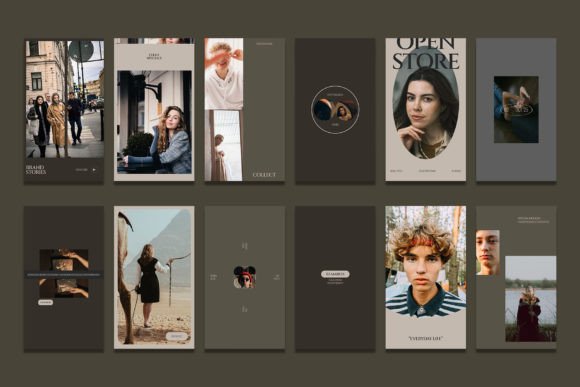
In the fast-paced world of social media marketing, visual consistency is not just a luxury; it is a necessity. For fashion brands, influencers, and boutique owners, maintaining a cohesive aesthetic on Instagram can be the difference between scrolling past a post and stopping to engage. This is where specialized design resources come into play. The Prizm Fashion Instagram Photoshop template serves as a powerful tool for creators who want professional-grade visuals without spending hours starting from scratch. By leveraging pre-designed layouts, users can focus on their core content while ensuring their feed looks polished and on-brand.
This guide explores how this specific PSD (Photoshop Document) file can streamline your workflow, enhance your brand identity, and save valuable time. Whether you are a seasoned graphic designer or a small business owner handling your own marketing, understanding the mechanics of these templates can elevate your digital presence significantly.
Understanding the Value of Smart Objects
One of the most intimidating aspects of using professional design files is the complexity of layers. However, the Prizm Fashion Instagram Photoshop template is built with user-friendliness in mind, primarily through the use of Smart Objects. A Smart Object is a container that holds image data from raster or vector images, such as Photoshop or Illustrator files. It preserves an image’s source content with all its original characteristics, enabling you to perform non-destructive editing on the layer.
For beginners, this means you do not need to worry about resizing pixels incorrectly or losing image quality. The process is straightforward and designed to be intuitive. Here is how the typical workflow operates within this file structure:
- Locate the Image Layer: Open the PSD file in Adobe Photoshop. Look for the layer named "Your Image" or similar, usually grouped within a folder labeled "Image Group."
- Access the Smart Object: Double-click on the thumbnail icon of that specific layer. This action opens a new tab containing the placeholder image.
- Insert Your Content: Drag and drop your own fashion photograph into this new tab. Adjust the size if necessary to fit the canvas.
- Save and Update: Press CTRL + S (or Command + S on Mac) to save the changes. Close the tab, and return to the main document. You will see your image automatically updated within the stylish frame of the template.
This method ensures that your photos retain their high resolution and aspect ratio, integrating seamlessly into the pre-designed layout. It eliminates the guesswork of alignment and masking, which are common pain points for non-designers.
Technical Specifications for High-Quality Output
When creating content for digital platforms, technical details matter more than many realize. The Prizm Fashion Instagram Photoshop file is configured to meet industry standards for both web display and potential print usage. Understanding these specifications helps you prepare your source images correctly before importing them.
The file operates at 300 DPI (dots per inch). While Instagram displays images at 72 PPI (pixels per inch), working at 300 DPI ensures that your design remains sharp if you ever decide to repurpose the content for flyers, lookbooks, or high-resolution website banners. It provides a safety net for quality, allowing you to scale down without losing clarity.
Additionally, the color mode is set to RGB. This is crucial because screens emit light, and RGB (Red, Green, Blue) is the standard color model for digital devices. Using RGB ensures that the colors you see on your monitor are accurately represented when users view your posts on smartphones and tablets. If you were to use CMYK (used for printing), your vibrant fashion colors might appear dull or shifted on screen.
The template includes versatile dimensions to cover different Instagram formats:
1080 x 1080 px for standard square feed posts.
1920 x 1080 px for stories or landscape-oriented highlights.
Having both sizes in one package allows for cross-platform consistency, ensuring your brand looks uniform whether a user is viewing your main grid or tapping through your daily stories.
Customization and Brand Identity
A template is only useful if it can be adapted to reflect your unique voice. The Prizm Fashion Instagram Photoshop resource excels in flexibility. Every text element in the file is fully editable using the standard Text Tool. This means you are not stuck with generic phrases like "New Arrival" or "Sale." You can input your specific promotional messages, pricing, dates, or brand slogans.
You can change the font family, size, color, and spacing to match your brand guidelines. For instance, a luxury boutique might prefer a sleek, serif font in gold tones, while a streetwear brand might opt for bold, sans-serif typography in neon colors. The ability to tweak these elements ensures that the template serves as a foundation rather than a restriction.
Consider a scenario where a small business owner is launching a summer collection. They can use the square format to showcase a model wearing a key piece, adding minimal text to keep the focus on the garment. Simultaneously, they can use the story format to create a dynamic announcement with larger text and a call-to-action button graphic. Because the layers are organized logically, making these adjustments takes minutes rather than hours.
Who Benefits Most from This Tool?
The appeal of this PSD file extends across various user groups. Freelance social media managers can use it to deliver consistent results for multiple clients quickly. Bloggers and influencers can maintain a curated feed aesthetic without hiring a dedicated graphic designer. Small business owners, who often wear many hats, can produce marketing materials that compete with larger brands in terms of visual quality.
Educators teaching digital marketing or graphic design basics may also find this tool valuable. It serves as a practical example of how layer organization, smart objects, and non-destructive editing work in a real-world context. Students can deconstruct the file to learn professional techniques by observing how effects and masks are applied.
Important Considerations Before Use
While the Prizm Fashion Instagram Photoshop template is designed for ease of use, there are a few things to keep in mind to get the best results. First, ensure you have access to Adobe Photoshop. Since this is a PSD file, it requires software that supports layered documents. Free alternatives may open the file but might not support Smart Objects or specific layer styles correctly, leading to broken designs.
Second, pay attention to the lighting and color balance of your own photos. A template can frame your image beautifully, but it cannot fix poor photography. Try to use images with similar lighting conditions to maintain a cohesive look across your feed. If one photo is bright and airy and the next is dark and moody, the transition might feel jarring even within a consistent template.
Finally, remember that while the template provides a structure, creativity still plays a vital role. Experiment with different cropping positions within the Smart Object. Sometimes, zooming in on a detail of a fabric or accessory can create a more compelling visual than a full-body shot. The flexibility of the Prizm Fashion Instagram Photoshop file allows for this kind of creative exploration, making it a versatile asset in any digital marketer’s toolkit.